Life Before Feature Toggles
A space for learning, creating, and cutting tough topcis down to size
This article is part of a series I'm writing about feature toggling, framed through my experiences working on the AWS Console. This first part in the series focuses on what our SDLC was like before feature toggles. Future articles will cover our path to adopting feature toggling, the feature toggling solution we built, and best practices and patterns I've personally landed on.
TL;DR
Back around 2013, when I was tech lead for the AWS Database Services User Experience team, our Software Development Lifecycle (SDLC) was more complex, stressful, and manual than I wanted it to be. This led to increased risk of launch delays and finding bugs at the last minute, which had knock-on effects for our future launches. This article uses a simplified, example set of feature launches to describe the challenges, and then provide lessons I learned along the way. These learnings fed into us building and adopting an internal feature toggling solution that I'll outline in future articles.
Lessons learned include: 1) automation is a mindset not a deliverable, 2) your production release pipeline should always be in a deployable state, 3) keep non-deterministic procedures as simple, repeatable, and constrained as possible, and 4) proactively evolve your SDLC to reduce cascading instability across launches
Introduction
My journey with feature toggles1 started around 2013, during my time as tech lead for the AWS Database Services User Experience team (DBUX). In 2013, DBUX was a small two-pizza team2 that built and maintained the Amazon Relational Database Service (RDS), DynamoDB, ElastiCache, and Redshift service consoles in the AWS Management Console. While the consoles shared a common tech stack, each service console was an independently maintained and deployed website. We owned the release schedule for UX improvements, but our major service feature release schedules were owned and driven by the product leadership of the associated backend AWS service teams. In addition to the team lead work, I was the primary dev for the RDS Console, which was deployed several times a month, both for UI enhancements and as part of the roughly 15-25 public RDS feature launches a year, some of which could take months to years of development. In this article we'll discuss how things were before feature toggles, in particular, the challenges we faced with our SDLC and release process that increased risk of failed launches and generally increased stress on the team. We'll also cover lessons I learned along the way which fed into our newer approach using feature toggles, which will be detailed in subsequent articles.
Note: The article will use a simplified version of the RDS Console tech stack to focus on the impact of feature toggles, rather than the real tech stack we used at the time.
Life Before Feature Toggles ("Launch Day Blues")
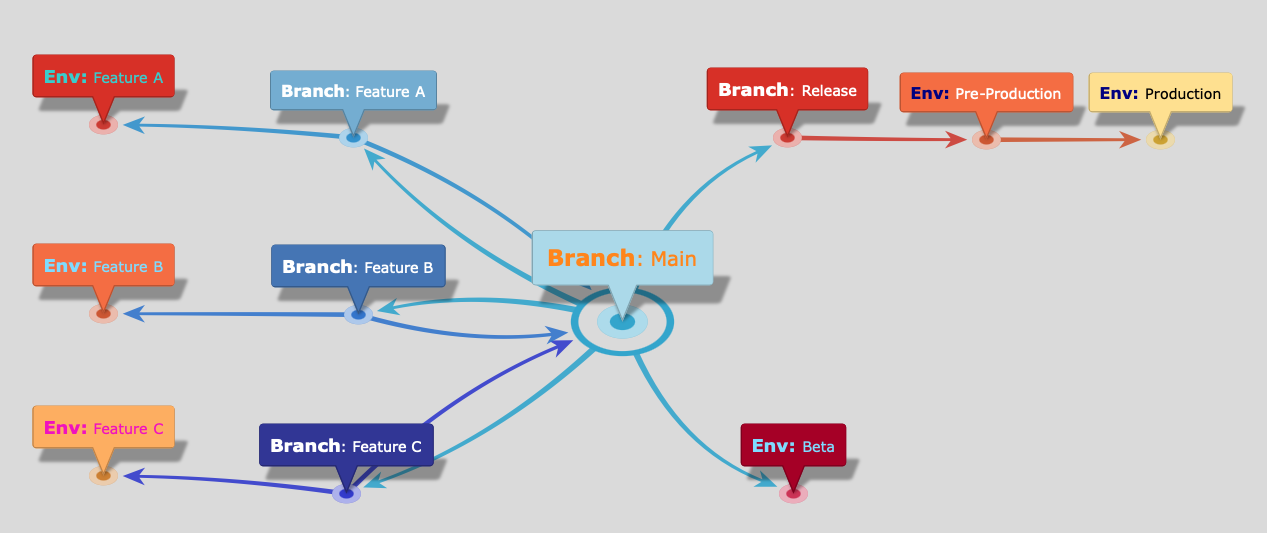
Before adopting feature toggling, our branching and release strategy for the RDS Console was loosely based around git-flow3. We had long-lived feature branches with feature-specific deployment environments for testing, a shared main development branch with a Beta testing environment, and a dedicated release branch that rolled out to separate pre-production and production environments. To highlight the impact of feature toggling, in particular some of the process complexities, I'll walk through a simplified example of our SDLC launch process. RDS had many subteams working on customer features in parallel, many requiring Console work. In this example we'll call them features A, B, and C which were created from our main branch.
Source Control Branches
| Branch | Description |
|---|---|
| main | Our primary tracking branch for development which reflected the latest and greatest shared state |
| release | The code in release was either already in production or in the process of being launched. We tried per-release branches but consolidated them down to a single release branch for simplicity |
| feature-X | We used feature-specific branches for active feature development where the features weren't just a simple commit to main. |
High-Level Deploy & Merge Flow
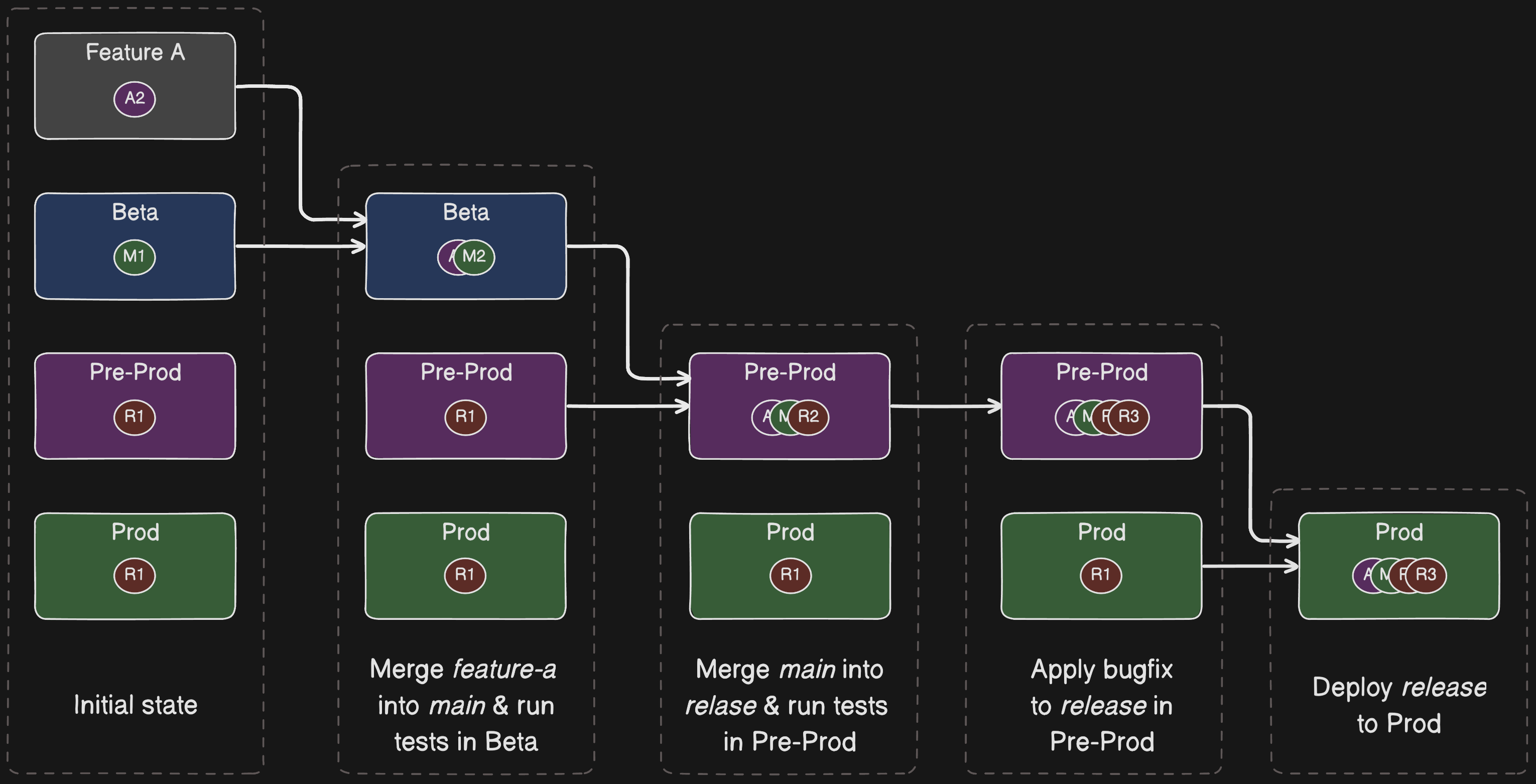
We had automated deployment pipelines that would deploy to test environments and run automated regression tests. Feature branches would have dedicated testing environments wherever necessary. main deployed to a Beta environment. release deployed out to Pre-Prod and Prod environments.
Feature Release Workflow: Happy Path
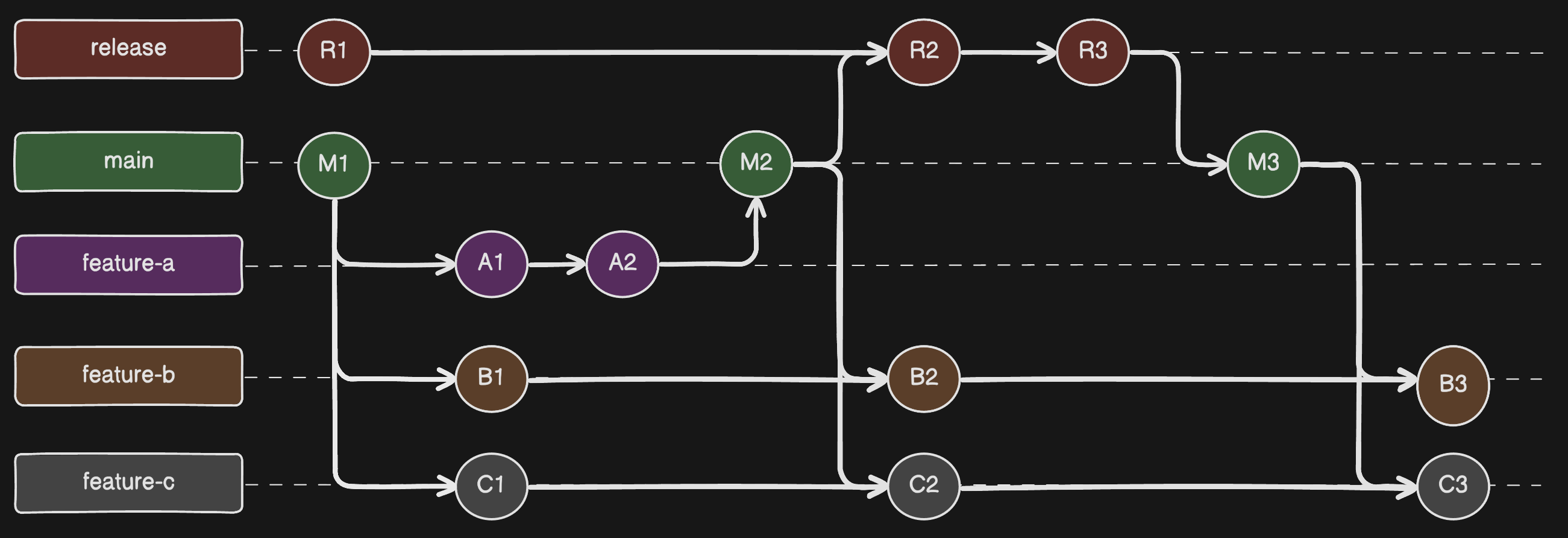
Let's use the example of launching Feature-A to highlight the merge, deploy, and test process we had. Once Feature-A was code complete, which in this case was just two commits to feature-a [A1, A2], we would:
- merge feature-a into main
- verify main works properly in our Beta environment
- merge main into release
- test the new release code in Pre-prod and apply any fixes, in this case we add commit R1
- deploy tip of release to our Production environment
- merge release back into main, if there were last minute fixes
- merge main into other ongoing feature branches feature-b and feature-c
Git Changes
Deployment Flow
Launch Day!
Once Feature-A was successfully out to customers, Feature-B's launch would eventually come around. Feature-B followed the same merge and deploy process detailed above for Feature-A. But in this section we'll focus on what the mechanics of launch day were like before feature toggles. On the day of launch, an engineer from DBUX would join a launch call with others from product, backend services, AWS Docs, SDKs, and all other relevant teams. There was a launch coordinator, typically the product manager for the feature, who would let everyone know when they were good to release their changes. When told, we'd initiate the deployment of the latest release branch, which contained Feature-B, to the RDS Console Production environment. We typically deployed right after the backend service as the Console code needed the backend APIs to be updated first.
Let's take a pause here for a moment to highlight what's happening. On the day of the public launch we were deploying our new code to production for the first time ever. We were testing the feature in Prod at the same time customers were getting exposed to it!! Some of our features were very large changes that may have taken months of development, but we couldn't test them in Prod because we didn't have a way to separate out what customers saw, from what we saw. This problem was compounded by the cross-service dependencies, such as the RDS Console code being dependent on the RDS backend APIs being released. As you can either imagine, or have already experienced yourself, this was stressful, nerve-wracking, and too often resulted in failed launches.
I should call out that, as is required of all teams at AWS, we followed a plethora of deployment safety best practices. These included gradual rollouts (such as with one-boxing and regional deployment waves), two-person approval (or vetted automation), pre-determined rollback procedures, and more. I won't spend much time on these rollout processes in this article as they're related but tangential to the core point about feature toggling. Deployment safety practices, particularly automated ones, are a crucial part of any release pipeline whether you have feature toggling or not. Additionally, since the feature would be visible to customers while we tested it, we would launch during non-peak hours.
Okay, back to the launch call where we'd just released Feature-B into the wild. Since this was our first opportunity to test Feature-B in production, everyone on the call would swarm on manually testing the RDS Console. We would test both Feature-B itself and regression test existing RDS features. We did have some automated UI testing based on Selenium but, while we always strived for automation, our automated test coverage wasn't anywhere near complete. We routinely fell into a trap of using manual testing to meet deadlines.

Lesson #1: Automation is a mindset not a deliverable
Automating repetitive manual work is a no-brainer but, while most developers want to automate, we often struggle to prioritize it. I've been snared in this trap many a time. Each time you go to do a task it's so easy to feel like there's no time to automate, so you just keep doing it manually, over and over again. We're all usually under the time pressure of deadlines so, when there's uncertainty about how to automate and how much time it'll take to implement, we stick with the known path. This automation hump is particularly tough to overcome as it often takes more time to automate the task rather than just "getting it done" this one time. And, if you're anything like me, you'll have a sincere belief you'll automate it later but later never comes. Automation is a mindset, not a one-time task to complete. You have to repeatedly get over the automation hump with every new change. This means you should proactively spend time flattening the hump so people aren't diverted.
There's no silver bullet to achieving and maintaining automation but here are some approaches I've found helpful: 1) automation is a mindset - try and work automation into every task you do, even in small ways, even if it's making improvements to existing automation, 2) don't rely on good intentions - proactively include automation tasks in your backlog, it's not always easy to work it into other tasks, 3) incentivize and gamify - create recurring awards, shout outs, and do group hackathons centered around automation, and 4) hire and develop - if it fits the dynamics of your team then, hire folks who are dedicated to reliability and automation, such as SREs and SDE-Ts. Also, whether you have dedicated people or not, have folks with more knowledge about automation give workshops, pair program, and generally build up others.
We found Lesson #1 particularly important as, while AWS customers might typically deploy to 1-3 AWS regions (e.g. for regional redundancy), AWS services themselves have to deploy across all AWS regions supported by the service. As a fairly core AWS service, RDS had to deploy across all regions globally. This dramatically increased our deployment time, particularly due to our per-stage bake time5, testing surface area, and overall release complexity. Things could get complicated if we discovered a blocking issue in one of the last regions we deployed to. Ideally we'd run the same level of testing in every region, but without sufficient automation that was impractical and error prone. Back in 2013 we had an automated release pipeline that took care of the actual deployments themselves, but we had manual approval checkpoints before promoting to the next environment and still relied on manual testing for full confidence. Automated testing coverage has dramatically expanded since 2013 but, back in those days we only had automated tests for certain critical paths. We did more rigorous manual testing in the early stages of the production pipeline, then progressively reduced the manual testing as we built confidence in the new release. As manual testing reduced, we'd rely on the targeted automated tests to alert us if something was broken.
As was sometimes the case, let's assume that our last minute testing uncovered a bug in Feature-B. Launch day bugs could come from any one of the relevant teams, so let's say this bug stemmed from an issue in the backend RDS APIs. Let's also say the problem was severe enough to block the launch but that the team needed more time to do a proper root cause analysis. As such, a decision was made to postpone the official public launch until the following month. Given we'd already released Feature-B to customers, we had to quickly rollback the production deployment and then do a more thorough rollback and cleanup process.
Lesson #2: Your Production release pipeline should always be in a deployable state
It's important to keep your entire Production release pipeline in a deployable state. Leaving it inconsistent is a common source of production issues and is a lesson we learned the hard way in DBUX. Doing a full rollback means that oncall operators are dealing with a fresh and clean release pipeline if they're paged. You don't want operators to have to cleanup the pipeline in the middle of an operational event or, even worse, the operator might not know about the delayed feature release and accidentally patch and release the broken feature code with the patch.
In our example, Lesson #2 means rolling back the entire release pipeline, across Prod, Pre-Prod, and the release branch to its prior state. This is a real-world situation we encountered where, following a failed feature launch, we only rolled back Prod and decided to leave the release branch and Pre-Prod with the broken commit at the HEAD. We planned to finish the rollback on the next work day, but Murphy's Law4 raised its ugly head and an unrelated production issue just so happened to crop up that night. The oncall operator didn't notice that release contained the delayed feature and accidentally re-released the broken code into production, causing further issues.
Feature Release Workflow: Rollback
Following Lesson #2, our feature rollback process was roughly as follows:
- immediately fix the customer experience by rolling our Prod environment back to the previous version without Feature-B
- revert the release branch to the commit that matches Prod using
git reverton the Feature-B commits - deploy that commit through the entire release pipeline
Changing Tracks: Handling Feature-Collisions
It was very common for us to have RDS features releasing very close to one another, sometimes with multiple independent features launching in the same week, particularly in the run-up to AWS re:invent or an AWS Summit. This added significant complexity to our merge and deploy process, particularly in situations where a scheduled feature launch was delayed. Delays were fairly common as they weren't only due to bugs found on launch day, they were often just product or leadership decisions made in the days before a launch.
Using our ongoing example to highlight the complexity this added to our SDLC, let's say that Feature-C was scheduled to launch a couple of days after Feature-B. With Feature-B's launch date being moved to the following month, we've now flipped their launch order which impacts acceptable code-level dependencies. Since Feature-B was 1) in the release branch and Production release pipeline, and 2) already merged into the main and feature-c branches, we had to apply source-control and deployment changes that were complex enough that it was easy to mess things up. The key point is that, since Feature-C's commits were now based on Feature-B's, in order to launch Feature-C cleanly we had to remove Feature-B from Feature-C.
In the best case scenario, removing Feature-B commits from Feature-C is cleanly done through git revert. Unfortunately, things weren't always that simple and the ease of untangling the code varied greatly depending on how coupled or overlapping the Feature implementations were. For example, when two separate features made changes to the same APIs, data models, or UI screens. It was also common for new commits to have been made on feature-c and/or main, since feature-b was merged into them. In these scenarios, where feature-b commits didn't cleanly revert, we had to do manual code changes to main and feature-c which dramatically increased the risk of messing up the Feature-C launch.
Lesson #3: Keep non-deterministic procedures as simple, repeatable, and constrained as possible
Per Lesson #1, while you should automate everything that can be reliably automated, not everything can be reliably automated. Super well specified tasks with deterministic outcomes, such as following a decision tree, are some of the best places to start automating as they usually have a good shot at being reliable. However, some tasks are inherently fuzzy and non-deterministic, whether through the nature of the steps being performed (e.g. concurrency and distributed systems) or that judgement is required that can't be put into rules. These non-deterministic tasks are the ones that typically fall on humans to perform, although these days we also delegate some of them to AI agents where a task is sufficiently constrained, non-critical, or relies on a human-in-the-loop.
Non-deterministic tasks will always exist in our messy, uncertain world. And, whether these tasks are being operated by humans or AI, the more intricate, variable, and open to interpretation these processes are, the more chance they'll get messed up. Since these pre-feature toggling adventures pre-date agentic AI, this lesson was for human operators, but it applies similarly to LLM-backed AI systems too. The key lesson is to spend time capturing and encoding the processes and best practices your team follows, whether as runbooks or tools and utilities. Don't worry too much about creating perfect processes, as the saying goes "don't let perfect be the enemy of good"6 (related to satisficing7), and even lo-fi, incremental solutions can be very helpful. Something I've found particularly effective is collaborative documents where operators can add notes which eventually can become more formal parts of your process.
Back to our example, to prepare for Feature-C's release, we had to:
Feature Launch Workflow: Collision Deflection
- revert the feature-b commits in main, manually resolving conflicts
- test main in our Beta environment
- revert the feature-b commits in feature-c, manually resolving conflicts
- test feature-c in the Feature-C test environment
Once Feature-B was out of the way of Feature-C's launch, we could follow our standard Feature Release SDLC Workflow.
In our example, Feature-C's changes were overlapping enough with Feature-B that reverting the feature-b changes required significant conflict resolution. This cleanup became additional, unplanned work for the people working on Feature-C. And not just any work, it was manual, infrequently executed, and highly variable work that was prone to mistakes. We already found launches to be complicated and stressful, particularly as the Console being a reason for delaying a launch was both disappointing to us, our launch partners, and our customers. These last minute code-change kerfuffles due to feature collisions only compounded the problem.
Lesson #4: Proactively evolve your SDLC to reduce cascading instability across launches
You can think of Feature-B's delayed launch as creating cascading risk that propagates to Feature-C. This is a form of cascading failure8 that is transmitted through channels such as the codebase, deployment environments, and even team psychology. In this mental model, the risk waves are generated from changes to the steady-state, inertial reference frame of your deployment and development flow. The changes apply a form of contorting force that propagates through your SDLC and tech stack. The larger the force applied by the pivot, the bigger the wave. It then takes work, somewhat analogous to the physics sense of it, to dampen and dissipate those waves and return the software system to a manageable steady-state. Given your team has finite capacity to do work, the shorter the available time between launches the less likely you'll have reached a steady state before the next release.
The good news is that your SDLC practices, code health, and tech stack can both dramatically reduce the magnitude of the wave created by the pivot and make you way more efficient at getting back to equilibrium. This is akin to how mechanically engineered systems deal with unwanted forces and failures, such as buildings being designed to deal with earthquakes9 10. It's also similar to how distributed software systems can be architected to be more resilient11 12 13, something we obsess over at AWS. Thinking of your SDLC in this way, there are many things you can do to be more resilient, across your code modularity, team dynamics, and deployment processes.
Conclusion
This article talks through how, back in 2013, my team's SDLC process was overly manual and risk prone, particularly in ways that struggled to deal with delivery turbulence. The lessons in the article give high-level guidance on approaches that can help but, as was likely clear from the article title, one of the biggest positive changes we made was to adopt feature toggles as a core part of our SDLC. Feature toggles aren't magic and introduce new types of failure modes to deal with, but they're a pattern that, once adopted, isn't something the team would ever consider going back from. There's a reason that software teams all over the world independently, but repeatedly, converge on some form of feature toggling based solution. In future articles in this series on feature toggling I will cover topics such as how we approached feature toggling, the system we ended up building, and what I've come to believe are good patterns and recipes.
Read the full article with interactive diagrams at: https://jameshorsley.me/articles/life-before-feature-toggles